Save and certify
ZLens keeps two steps apart:
- Save keeps your work. The saved query (a
.dqlblock file) is a draft. - Certify is a person saying "this is right". ZLens runs its checks, and only if they pass does the saved query become Certified, with a record of who certified it.
Saving never certifies. Not in the saved query editor, not in Import SQL, not when Ask keeps a draft, and not from the CLI.
Save a draft
In the saved query editor, click Save draft.
- A saved query needs a name and an Owner before it can be saved.
- The saved query is written with
status = "draft". - If the saved query was already certified, your edit is saved as a separate draft beside it. The saved query editor says Saved as a draft beside the certified saved query. The certified version stays in use until this draft is certified. The draft is named name (draft edit) and is listed in the Drafts folder, next to the certified saved query that stays in use.
Certify a saved query
- Open the saved query in the saved query editor.
- Click Certify in the toolbar (Re-certify on a saved query that is already certified).
ZLens saves your latest edits, then checks the saved query. The certification panel, in the Metadata tab at the bottom, shows each check: Metadata, Validation, Run, Tests, Chart · optional and Lineage · optional.
When it passes, the panel reads Saved query certified, the badge changes to CERTIFIED, and a receipt line appears under its name on the overview (the only place the saved query editor shows it):
Certified by you@example.com · 10/15/2026, 3:27:48 PM · via the saved query editor · OSS rules
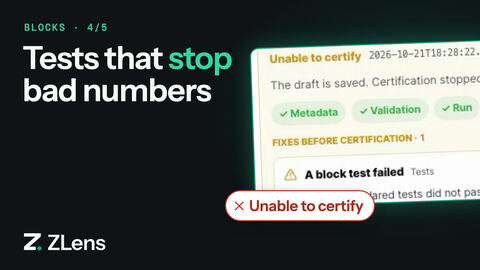
When it does not pass, the panel reads Unable to certify and lists Fixes before certification. Each fix says how to fix it and has a button for it, such as Run saved query or Edit source. Your draft stays saved and nothing is half-certified.
Other places that certify
The saved query editor's Certify is not the only one. These run the same rules and write the same receipt:
| Where | Action | Receipt says |
|---|---|---|
| Import SQL | Certify on a saved draft | via: sql-import |
| App Studio, data checked from a table (or a saved query made row-level) | I vouch for this — certify, at publish or under ⋯ → Certify… | via: app-dataset |
| App Studio, a saved query | Certify now in the publish dialog, or ⋯ → Certify…: a short review (it runs, its tests, who owns it, what one row is), then I vouch for this — certify | via: app-dataset |
| Terminal | zlens certify --from-draft <path> |
via: cli |
Certify from an App
In App Studio a saved query certifies without opening the saved query editor
(see Check vs certify). The review runs
the saved query and its tests now, by the rules below, and shows It runs,
Its tests pass (each test and how it did), Who owns it and What one
row is. When the saved query names no owner, the review asks for one, and
ZLens writes owner = "…" into the .dql file together with the
certification. If a test fails or it does not run, nothing is written. The
receipt records who certified it and when, and its checks add plain lines
such as Tests: All 2 tests pass. and Owner: Maria Lopez. Open in the saved
query editor stays one click away.
The rules
To be certified, a saved query must:
- have an Owner,
- compile and run successfully, and
- pass every test it declares.
Tests are optional: a saved query with no tests can be certified, and the receipt
records the missing tests as a warning. --enterprise rules require at least
one test.
A description that still says "review required" also stops certification. The saved query editor offers to remove those words or let you edit the description.
Other checks are warnings: an AI-facing description (LLM context), tests,
grain, declared outputs, entities and a review cadence. They are recorded on
the receipt. With zlens certify --enterprise, they become requirements.
Add tests
Tests are assertions about the saved query's result. Certify runs them; running the saved query does not. In the saved query's DQL:
tests {
  assert row_count > 0
  assert revenue >= 0
  assert region IN ["east", "west", "north"]
}
row_countcompares the number of rows.- A column test (
assert revenue >= 0) must hold on every row. The first row that breaks it is reported, with how many rows fail. IN [ … ]holds when every row's value is one of the listed values.==,!=andINcompare numbers as numbers and other values as text.>,>=,<and<=need numbers; an empty or text value fails them.- A column test on an empty result passes. Add
assert row_count > 0when the saved query must return rows.
In the visual builder, use the Tests box. If a test fails, Certify stops
with A saved query test failed. zlens certify and zlens test check tests the
same way.
Where the receipt is kept
Each saved query has a companion YAML file under semantic-layer/blocks/. When you
certify, ZLens writes:
reviewStatus: certified
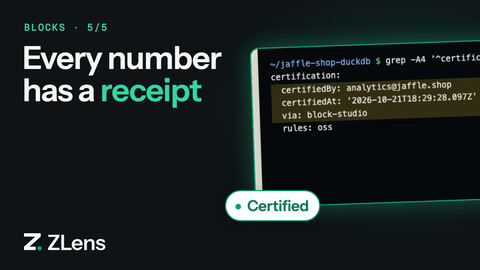
certification:
  certifiedBy: you@example.com
  certifiedAt: '2026-10-15T20:27:48.466Z'
  via: block-studio
  rules: oss
  sourceSha256: b8e2…
  checks:
    - metadata
    - validation
    - run
    - tests
  warnings:
    - 'Block has LLM context: No llmContext set — agents will fall back to description/SQL'
sourceSha256is a fingerprint of the saved query source that was certified.checkslists the checks that passed, andwarningsthe advisory warnings (missing tests, LLM context, grain, …). Either is left out when empty.- Certified by is the person signed in when a hosted server runs ZLens.
Locally it is
identity.ownerindql.config.json; when that is not set, your git email (git config user.email), then your computer's user name.
Edited after certification
A certified saved query stays certified only while its source is the one that was
certified. If someone edits the .dql file outside ZLens (in an editor, a
merge or a script) and leaves status = "certified", the source no longer
matches the receipt's sourceSha256, and ZLens treats the saved query as needing
recertification:
- The saved query editor shows the RECERTIFY badge and says Edited after it was certified.
- Ask, Apps and AI agents do not use it as certified evidence.
zlens compilelists the saved query aspending_recertification, andzlens verifyandzlens certify <file>print a warning.
To clear it, open the saved query, check the change, and click Re-certify (or certify it again from an App). A new receipt is written for the edited source.
ZLens keeps the date it was certified, so the App surfaces and the review say
Changed since it was certified on 22 Oct rather than Nobody has certified
it yet. A saved query that ZLens itself sends back to draft or review (an
edit saved in the editor) keeps the same date in its companion YAML as
previousCertification (who certified it and when, as history, never a
claim); certifying again replaces it with a new receipt.
A saved query certified before ZLens wrote receipts has no sourceSha256 to compare
with, so it stays certified. Editing a certified saved query in the saved query editor never
needs this check: saving an edit writes a draft beside the certified saved query.
What Ask shows
When Ask answers from a certified saved query, the answer is labelled Certified answer, and the line under it reads from saved query name · Owner: owner.
Certify from the terminal
Check a saved query without changing it:
zlens certify blocks/finance/revenue-by-segment.dql
It runs the saved query's tests on the project's connection and prints
Status: ✓ CERTIFIABLE or Status: ✗ NOT CERTIFIABLE with the reasons. It
exits with code 1 when the saved query does not pass, and writes nothing. The rules
are the same as the saved query editor's: tests are optional (a saved query without tests
gets a warning), and --enterprise requires at least one.
Note
A DuckDB file can be opened by one program at a time. When zlens
notebook is running for the project, the terminal commands run the saved query
through it, so you do not need to stop it.
Certify a draft:
zlens certify --from-draft blocks/_drafts/top-customers.dql --owner you@example.com
When the checks pass, it moves the draft to its normal place, sets it to
certified, writes the receipt (with via: cli), and prints
✓ Promoted <draft> -> <path>. Then run zlens compile to refresh
dql-manifest.json. When the checks fail, the draft is unchanged.
Retire a saved query
- Open a certified saved query and the Metadata tab at the bottom.
- Click Deprecate. It takes effect at once; there is no confirmation.
Only certified saved queries have Deprecate.
Deprecating keeps the saved query's certification receipt in its companion YAML and records the deprecation beside it:
reviewStatus: deprecated
certification:
  certifiedBy: you@example.com
  certifiedAt: '2026-10-15T20:27:48.466Z'
  via: block-studio
  rules: oss
  sourceSha256: b8e2…
deprecation:
  deprecatedBy: you@example.com
  deprecatedAt: '2026-10-21T09:12:03.120Z'
  via: block-studio
  previousStatus: certified
The receipt is kept as history: with reviewStatus: deprecated, Ask, Apps
and the saved query editor no longer treat it as certified. Deprecated by is
found the same way as Certified by. Moving the saved query back to draft
removes both records.
To send people to a newer saved query, set replacedBy in its source. The saved query editor
then shows Replaced by with Open the replacement →.