Read an App
An App is a set of dashboard and report pages built from saved queries. Every tile says how far to trust it, and you can ask questions about what the page shows.
The workbench opens on Apps.
- Open the Jaffle Growth Review App from Apps.
- The header and the page both read All tiles certified.
- Scroll through the tiles; each one is labelled Certified.
- Ask "How has revenue changed by month?" in the App's Ask box.
- The answer opens beside the page, scoped to Jaffle Growth Review, labelled Certified answer, answered from a certified block.
Open an App
- In the left rail, click Apps.
- The library lists your Apps. Use the tabs (All, Not published yet, Private, Shared, Favourites) or Search apps, domains, owners... to find one. A new App you have not published says Not published yet and only you can see it; a published App you are editing says Unpublished changes (only you can see them) on its card. The counts next to the tabs count these same cards.
- Click View on the App's card.
Each card shows how many Pages the App has, when it was last Updated, and how many of its tiles are certified, for example All tiles certified or 3 of 4 tiles certified.
The App opens on its first page. At the top you see the App's name and the same count for the page, for example 3 of 4 tiles certified. View and Edit switch between reading and building; see Build an App.
Read the trust on each tile
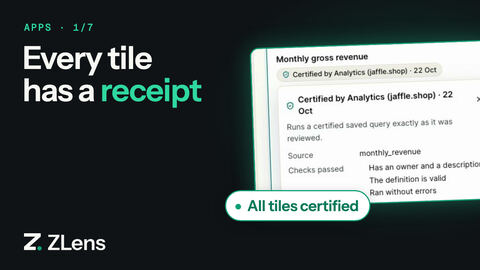
Each tile says one of two things:
| Label | Means |
|---|---|
| Certified by name · date | Everything the tile uses is certified — its data, every join it can reach and, for a calculation, every input — and it says who certified it and when, for example Certified by Kranthi · 21 Oct, or Certified by you. |
| Not certified yet | Nobody has vouched for something the tile uses yet. The receipt says why, for example Checked by you, not certified yet, Changed since it was certified on 22 Oct or Uses a join nobody has certified. |
A tile that cannot run says Blocked, for example because of a policy.
Data certified before ZLens recorded who certified it says Certified · 21 Oct, or just Certified. Other labels also say how fresh the result is, such as Updated just now.
Click the label to open the tile's receipt. It shows the Source, the Filters applied (or None applied), the number of Rows, and when it was Last refreshed. Some rows appear only when there is something to show:
- Certified names who certified the tile's data and when. It appears on a certified tile.
- Checks passed lists the checks recorded when the data was certified, for example what one row is, how numbers are shown, and its tests. It appears only on a certified tile whose certification recorded checks.
- Owner appears only when the page's author filled in the tile's Owner in App Studio's tile settings.
- Joined lists each join the tile used, for example Joined to locations on location_id (each order has one location — checked).
Ids, the source file and the fingerprints of the result and the SQL are under Technical details, which starts closed. Show the query and SQL opens what ran.
The bar above the tiles summarizes the page, for example All tiles certified or 3 of 4 tiles certified. Turn on Trust lens to highlight each tile's trust.
Some pages have a Summary (auto-written) above the tiles: a few sentences about the page's current numbers. It appears only when the page's author added it. The Evidence & review appendix at the bottom says when the page was last refreshed and which tiles are not certified yet; ids are under Technical details.
Note
An App can be published with tiles that are not certified yet, and readers see Not certified yet on them. A project can require every tile to be certified before an App is published; see Publish.
Words used in App Studio
App Studio uses one small set of words:
| Word | Means |
|---|---|
| App | A set of dashboard and report pages you publish together. |
| Page | One dashboard or report inside an App. A reader switches pages with Pages. |
| Tile | One KPI, chart, table or text box on a page. |
| Data | What an App reads, chosen from one list on Data for this App or with + Add data…. Each item says where it comes from: table, saved query or Metrics. |
| Field | A measure to add up or count, or a dimension or time to group by. You build tiles by picking fields. |
| Filter | A control above the tiles that narrows what the page shows, such as a region or a date range. |
| Domain | A Domain groups data by business area, like Sales or Finance. It filters the lists; it is not a kind of data. |
| Table | A table in your database. ZLens checks it once (Check and add → Check and use) before you use it. |
| Not certified yet | Nobody has vouched for the data (or for a join or input a tile uses) yet. You can build and publish with it; its tiles say Not certified yet to readers. The receipt says why, for example Checked by you, not certified yet after Check and use. |
| Saved query | A reusable, reviewed query. Files and the CLI call it a block (a .dql block file). Its result's columns are its fields, with no review step: grouped by its own columns its values show as they are, otherwise numbers add up (Sum) and averages are never added up. |
| Make row-level | An action under a saved query's ⋯: ZLens checks what one row is and records it, for row-safe measures such as distinct counts. |
| Related table | A table that checked data points to through a many-to-one join (each order has one customer). Its fields show under the data as Orders → Customer, and totals stay the same. |
| Metrics | Measures and dimensions from a semantic model. |
| Certified | A person reviewed the data and vouched for it (I vouch for this — certify, or Certify in the saved query editor). ZLens always says who and when: Certified by name · date, and the receipt lists the checks that passed. A tile is certified when everything it uses is. |
| 3 of 4 tiles certified | The App's one count. The App header, the Apps card, the publish dialog and the published dql.app.json all show the same count. |
| Certified by | The person who certified the data: the signed-in person with a host, otherwise your git user.name. You read Certified by you for data you certified. Older data shows Certified · date or Certified. |
| Unpublished changes | Changes to an App that only you can see until you publish. |
| Summary | A short auto-written paragraph about a page's numbers. Off unless the author adds it. |
| Technical details | Ids, hashes and fingerprints, kept out of the way under a toggle that starts closed. |
Files, the API and the reference docs use a few more technical words: a checked table or a row-level saved query is a Dataset there, and a saved query is a block.
Change a filter
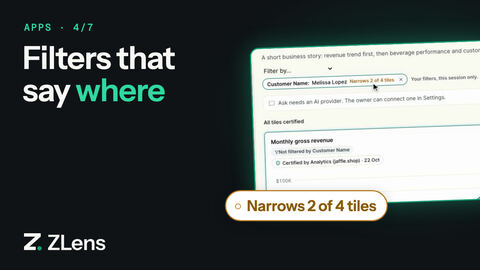
Filters sit above the tiles.
- Pick values from a searchable list, or set from and to dates.
- Reset puts a filter back to its default.
- If a filter does not apply to every tile, it says so, for example Region affects 2 of 3 tiles.
To filter by a field the App doesn't offer, click Filter by…, pick a field, then a value. A long list says Type to search all 930 values. Before you apply, the bar says Will narrow 2 of 4 tiles. After Apply, the chip reads Customer Name: Melissa Lopez · Narrows 2 of 4 tiles, and tiles without the field say Not filtered by Customer Name. On a saved-query tile the reviewed query runs as it is and only the matching rows are kept, so the tile stays certified and its receipt lists the filter. Your filters are for this session only.
Ask about the App
Type a question in Ask about App name… above the tiles and click Ask. A question about what the page shows is answered from this page's results; other questions go through Ask, limited to this App's domain and filters. The box needs an AI provider. See Ask about an App.
More on each tile
Point at a tile and click ⋯ to open its menu. The menu is there when you read the page, not in Edit. It lists only the items that fit the tile:
| Item | Shown when |
|---|---|
| How this was computed | The tile is not a text tile and has run or names its source. |
| View DQL | As above, and the tile is built from fields or shows a saved query. |
| Why did it move? | The tile is built from fields, adds up a measure by day, week, month, quarter or year, and has results. |
| Ask about this chart | The tile is built from fields and ran. It reads the chart's rows and needs no AI provider. |
| Ask AI about this | The tile shows a saved query and an AI provider is connected. |
| Open in notebook | The tile is not built from fields, for example it shows a saved query. |
| Show as | The tile has a result and more than one chart type fits it. |
| Download CSV | The tile has a result. With a host, the menu has Download CSV, Download JSON and Download Excel instead, made on the server, and a read-only link has no download. |
How this was computed has three tabs: How it works, DQL and SQL. The SQL tab shows the exact SQL that ran. On a tile built from fields, the last two are named Authored query spec and Executed SQL.
Follow, share and export
| Button | Does |
|---|---|
| Follow | Marks the page as one you follow (Following). |
| Share | Copies a link to the page: On this computer, or Read-only, on your network. |
| Alerts | Alert me when a number falls below, rises above or changes by an amount. Alerts are checked by zlens schedule start. |
| Export | Signed HTML, PNG image, or Print or save as PDF. |
See where the numbers come from
To see the page's sources (tiles, saved queries, dbt models and tables), click the lineage icon (Open dashboard lineage) in the App header. The App toolbar has no Lineage button. Lineage opens on this page; Back to App name returns to the App. The icon is not on a read-only link. When the page has a Summary, its View evidence button opens the same lineage. See Lineage.